
Buy Sell Indicator MT5
When trading on financial markets, one of the main tasks is to determine the possible direction of price movement in time. That's why traders use technical indicators that help structure chart analysis and find potential entry points.
Buy Sell Indicator MT5— a tool for MetaTrader 5 designed to visually display potential buy and sell signals directly on the price chart.
The indicator can be used in the analysis of currency pairs, gold, indices and other instruments available in MT5.It helps to assess the situation on the chart faster and can be used as an independent element of technical analysis or as an additional confirmation of a trading idea.
Important:the indicator is not a guarantee of a profitable trade. Any signal must be considered in the context of the overall market situation and confirmed by other analysis tools.
How Buy Sell Indicator MT5 works
Buy Sell Indicator displays signals directly next to the price movement. Thanks to this, the trader does not have to constantly switch between the chart and individual indicator windows.
The main idea of the tool is to highlight potential changes in the direction of movement and help determine the moments when the market may have an opportunity to buy or sell.
Depending on the situation on the chart, the indicator can display different color elements associated with BUY and SELL signals.
The presented chart clearly shows how the indicator accompanies the price movement and forms signal areas during various phases of the market.
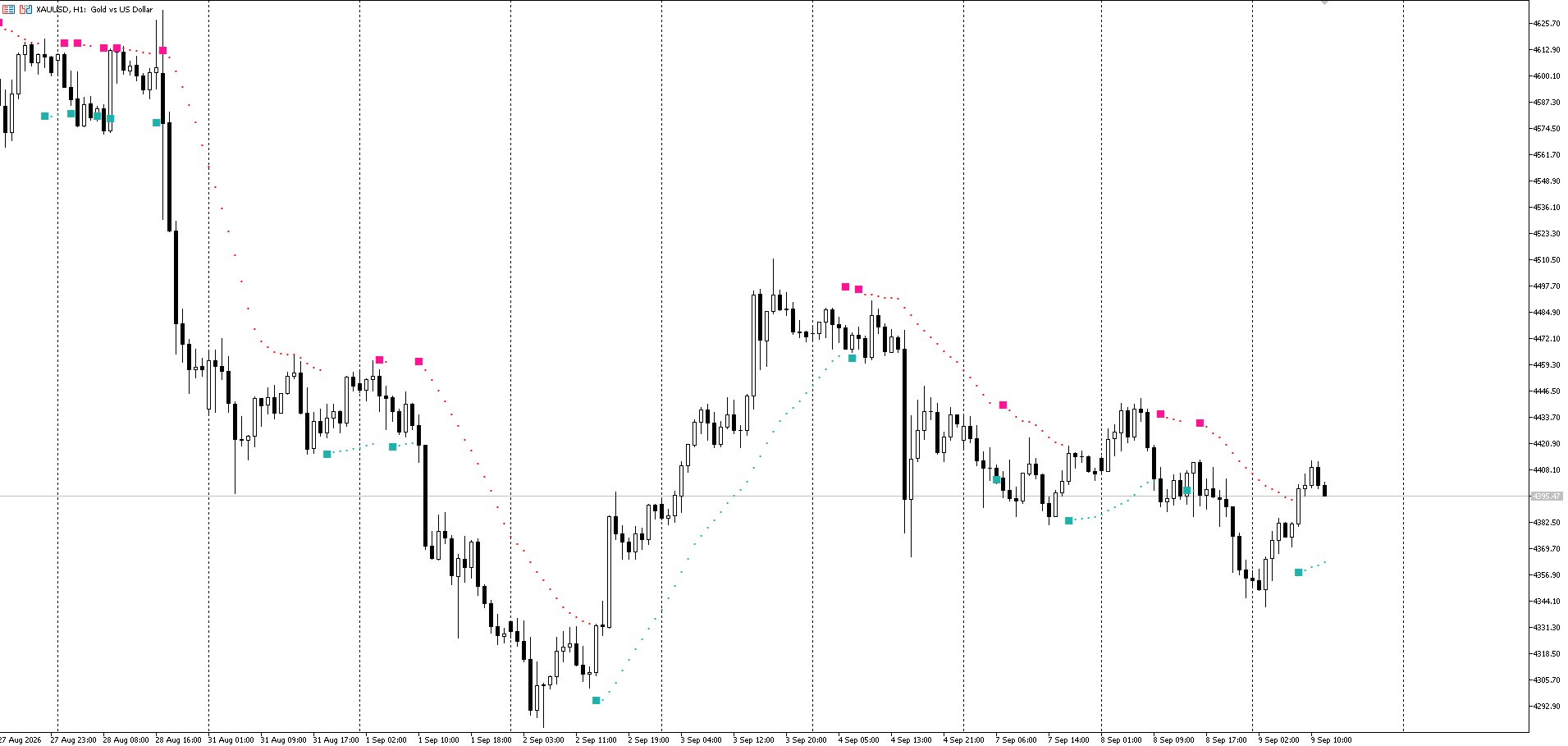
Buy Sell Indicator MT5 on XAUUSD chart, H1.
What the indicator signals show
One of the advantages of the Buy Sell Indicator is its visual simplicity. Signals are displayed directly on the price chart, so a trader can quickly match them with price behavior.
Depending on the direction of movement, the indicator uses color symbols:
LightSeaGreen— elements related to the potential buy signal;
DeepPink— elements related to the potential SELL-signal;
additional lines can be used for visual tracking of the signal and estimation of the current movement.
At the same time, the mere fact that the signal appears does not mean that the position must be opened immediately. It is much more effective to use the indicator as part of a comprehensive trading system.
For example, the signal may be further compared to:
direction of the main trend;
support and resistance levels;
behavior of candles;
volatility;
readings of other technical indicators.
This approach makes it possible not to take each individual indicator value as a ready-made trading recommendation.
Buy Sell Indicator MT5 Settings
The indicator has several basic parameters that allow you to adapt it to the trading style used.
In the standard configuration in the screenshot, the following values are used:
Parameter | Value |
|---|---|
MA Period | 14 |
Smoothing method | Simple |
Price | Close price |
ATR Period | 60 |
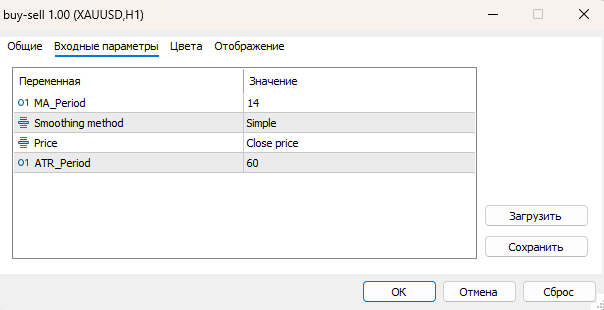
Key parameters of Buy Sell Indicator MT5 in MetaTrader 5.
MA Period
ParameterMA Perioddetermines the period of the moving average used by the indicator in the calculations.
Value14is a standard option that can be used as a starting point. A change in the period may affect the sensitivity of the indicator to price changes.
A smaller value usually makes calculations more sensitive to short-term movements, while an increase in the period can smooth out the indicator's response.
Smoothing method
In the parameterSmoothing methodmethod usedSimple, that is, simple smoothing.
This allows you to use the standard version of calculating the moving average without further complicating the settings.
Price
In the parameterPricevalue selectedClose price— candle closing price.
It is the closing that is used as the initial price for the corresponding calculations of the indicator.
ATR Period
ATR Periodis responsible for the calculation period of the Average True Range — an indicator that is used to assess market volatility.
In the presented configuration, the value is set to60.
ATR is particularly useful in trading systems where it is important to consider not only the direction of price movement but also the current market volatility.
How to use Buy Sell Indicator in trading
Buy Sell Indicator can be used at different stages of market analysis.
1. Determination of potential direction
The first option is to use the indicator signals for an initial assessment of the direction of movement.
If elements appear that match the BUY-scenario, the trader can look for additional confirmations for a potential long position.
Similarly, a SELL-signal can be an occasion to search for confirmations in favor of a short position.
2. Confirmation of the trading idea
The indicator can also be used not to independently search for deals, but as an additional filter.
For example, a trader has already identified an uptrend using market structure and support levels. If the Buy Sell Indicator also shows a potential buy scenario, the signal can be used as an additional confirmation.
3. Working with the trend
Trending movements often provide clearer signals than sideways market periods.
Therefore, before opening a position, it is worth assessing the general structure of the chart and determining whether the market is in a pronounced movement or consolidation.
4. Use in conjunction with other tools
Buy Sell Indicator does not have to be used separately.
It can be combined with:
Moving Average;
RSI;
MACD;
support and resistance levels;
trend lines;
candle models;
volatility analysis.
Combining several independent factors can help filter out some of the weak signals.
On which timeframes to use the Buy Sell Indicator
The indicator can be tested on different timeframes depending on the trading style.
For short-term trading, traders may consider younger periods, for exampleM5, M15 or M30.
Suitable for intraday analysisH1 & H4, whereas for a more relaxed trade, you can analyzeD1.
At the same time, there is no universal "best" timeframe. Optimal settings depend on the instrument, volatility and trading strategy.
Before using the indicator on a real account, it is advisable to test its operation on historical data and on a demo account.
Buy Sell Indicator and trade with MetaTrader 5
One of the advantages of the indicator is that it works directly in the environmentMetaTrader 5, so the trader can analyze the chart at the same time, use additional technical tools and manage positions from one terminal.
If you want to not only test the indicator, but also apply it in a real trading environment,you can trade and practice working with the indicator with Avora Markets.
You can trade and practice working with the indicator with Avora Markets
Download Buy Sell Indicator MT5
After downloading the file, you must install it in the appropriate MetaTrader 5 indicator folder and restart the terminal or update the list of indicators.
How to install Buy Sell Indicator in MT5
After downloading the indicator, the installation process takes only a few steps:
OpenMetaTrader 5.
Go to the menuFile → Open Data Folder.
Open the folderMQL5 → Indicators.
Copy the indicator file to this folder.
Restart MetaTrader 5 or refresh the list of indicators.
FindBuy Sell Indicatorin the indicators section.
Drag it to the desired graph.
If necessary, change the indicator parameters.
After installation, the indicator will be displayed directly on the chart of the selected trading instrument.
Benefits of Buy Sell Indicator MT5
The main features of the indicator include:
visual display of signals directly on the graph;
simple structure of basic settings;
the ability to use different MA and ATR parameters;
the ability to adapt to various trading instruments;
compatibility with MetaTrader 5;
the possibility of using as an independent or additional analysis tool.
The main advantage of this approach is the time savings in the initial assessment of the schedule. Instead of constantly manually analyzing several parameters, the trader receives additional visual landmarks directly next to the price.
Indicator Limitations
Like any technical indicator, the Buy Sell Indicator should not be taken as a stand-alone system that guarantees results.
The most difficult periods for such tools may be:
lateral movement;
a sharp increase in volatility;
release of important economic data;
sharp reversals;
low liquidity.
Therefore, the presence of BUY or SELL-signal does not eliminate the need for risk management.
Before using on a live account, it is recommended to conduct your own testing on the selected tools and timeframes.
Conclusion
Buy Sell Indicator MT5is a simple visual tool for MetaTrader 5 that helps to structure technical analysis and pay attention to potential BUY and SELL scenarios.
It can be used when working with currency pairs, gold, indices and other trading instruments available in MT5.
At the same time, the most rational approach is not to perceive a single signal as a ready-made trading recommendation. It is better to use the indicator together with the analysis of the trend, levels, volatility and other elements of the trading strategy.
If you want to test the indicator in real market conditions,can be traded and practiced with Avora Markets: